








本节概述了如何使用事件验证连接器实例。每个连接器都不同,因此请查看“ 连接器指南”的“事件”部分。您可以通过SAP Cloud Platform Open Connectors或API进行身份验证。
使用轮询验证连接器实例使用事件验证连接器实例与验证实例的工作方式相同,您只需打开事件并设置更多参数即可。
要使用轮询事件对连接器实例进行身份验证,请将轮询配置添加到POST / instances请求的JSON主体。有关要针对特定于连接器的步骤进行监视的连接器,请参阅“ 连接器指南”的“身份验证和事件”部分。
有关此处描述的每个字段的详细信息,请参阅轮询参数。
轮询配置在configurationJSON对象中,在使用轮询事件验证连接器实例时添加以下事件和轮询配置参数:
event.notification.enabled:trueevent.vendor.type:pollingevent.notification.callback.url:<YOUR_CALLBACK_URL>event.notification.signature.key:<OPTIONAL_SIGNATURE_KEY>event.poller.refresh_interval:<NUMBER IN MINUTES>event.poller.configuration:< OLLING_CONFIGURATION>
以下是使用基本身份验证和所需轮询配置值的连接器示例。验证连接器实例的常用主体仅包括用户名和密码参数,其余的是事件和特定于轮询的参数。
{
"element":{
"key":"connectorKey"
},
"configuration":{
"username": "xxxxxxxxxxxxxxxxxx",
"password": "xxxxxxxxxxxxxxxxxxxxxx",
"event.notification.enabled": true,
"event.vendor.type": "polling",
"event.notification.callback.url": "http://mycoolapp.com",
"event.poller.refresh_interval": "<minutes>",
"event.notification.signature.key": "xxxxxxxxxxxxxxxxxxxxxxxxx",
"event.poller.configuration":{
"contacts":{
"url":"/hubs/crm/contacts?where=lastUpdated>'${gmtDate:yyyy-MM-dd'T'HH:mm:ss'Z'}'",
"idField":"id",
"datesConfiguration":{
"updatedDateField":"_info.lastUpdated",
"updatedDateFormat":"yyyy-MM-dd'T'HH:mm:ss'Z'",
"updatedDateTimezone":"GMT",
"createdDateField":"_info.lastUpdated",
"createdDateFormat":"yyyy-MM-dd'T'HH:mm:ss'Z'",
"createdDateTimezone":"GMT"
}
}
}
},
"tags":[
"<Add_Your_Tag>"
],
"name":"<INSTANCE_NAME>"
}
轮询参数
UI上的标签和按钮对应于JSON中的参数。下表显示了粗体的UI标签和按钮以及配置JSON对象中的等效参数代码格式。

[TD]
参数 描述 数据类型 已启用事件
event.notification.enabled
标识为连接器实例启用的事件。
默认值:假的。
布尔
事件类型
event.vendor.type
事件的类型,投票或者网络挂接。
串
事件通知回调URL
event.notification.callback.url
您希望SAP Cloud Platform Open Connectors发送事件的URL。
串
事件轮询器刷新间隔(分钟)
event.poller.refresh_interval
用于确定轮询器检查更改的频率的分钟数。
数
回调通知签名密钥
event.notification.signature.key
可选。用户定义的密钥,用于增加安全性以显示事件未被篡改。
串
配置轮询
event.poller.configuration
轮询的配置参数。提出:默认轮询配置表示最佳配置。虽然您可以更改轮询器配置中的任何内容,但我们建议您很少这样做并与SAP Cloud Platform Open Connectors支持结合使用。
JSON对象
轮询资源
资源名称(例如触点)
您将监视的资源的轮询事件配置。
JSON对象
网址
URL
用于查询资源更新的URL。
串
ID字段
idField
资源中用于唯一标识它的字段。
串
高级过滤
datesConfiguration
轮询中日期的配置参数。
JSON对象
更新日期字段
updatedDateField
标识更新对象的字段。
串
更新日期格式
updatedDateFormat
标识更新对象的字段的日期格式。
串
创建日期字段
createdDateField
标识已创建对象的字段。
串
创建日期格式
createdDateFormat
标识已创建对象的字段的日期格式。
串
使用网络挂接验证连接器实例 使用事件验证连接器实例与验证实例的工作方式相同,您只需打开事件并设置更多参数即可。
要使用webhook事件对连接器实例进行身份验证,请将webhook配置添加到POST / instances请求的JSON正文中。有关要针对特定于连接器的步骤进行监视的连接器,请参阅“ 连接器指南”的“身份验证和事件”部分。
[backcolor = rgba(0,0,0,0.08)] 注意:使用webhook事件对连接器实例进行身份验证时,请确保选中“连接器指南”以获取API提供程序所需的任何其他设置。
有关此处描述的每个字段的详细信息,请参阅Webhooks参数。
网络挂接配置 在configurationJSON对象中,在使用webhook事件验证连接器实例时添加以下事件和webhook配置参数:
event.notification.enabled:trueevent.vendor.type:webhooksevent.notification.callback.url:<YOUR_CALLBACK_URL>event.notification.signature.key:<OPTIONAL_SIGNATURE_KEY>
以下是使用基本身份验证和所需轮询配置值的连接器示例。验证连接器实例的常用主体仅包括用户名和密码参数,其余的是事件和特定于轮询的参数。
{
"element":{
"key":"connectorKey"
},
"configuration":{
"username": "xxxxxxxxxxxxxxxxxx",
"password": "xxxxxxxxxxxxxxxxxxxxxx",
"event.notification.enabled": true,
"event.vendor.type": "webhooks",
"event.notification.callback.url": "http://mycoolapp.com",
"event.notification.signature.key": "xxxxxxxxxxxxxxxxxxxxxxxxx"
},
"tags":[
"<Add_Your_Tag>"
],
"name":"<INSTANCE_NAME>"
}
<blockquote>{
网络挂接参数
UI上的标签和按钮对应于JSON中的参数。下表显示了粗体的UI标签和按钮以及配置JSON对象中的等效参数代码格式。
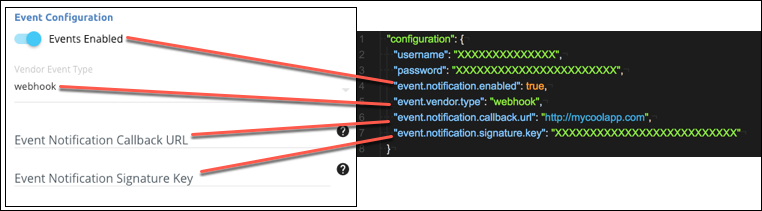
参数
描述
数据类型
已启用事件
event.notification.enabled
标识为连接器实例启用的事件。
默认值:false。
布尔
事件类型
event.vendor.type
事件的类型,polling或者webhook。
串
事件通知回调网址
event.notification.callback.url
您希望SAP Cloud Platform Open Connectors发送事件的URL。
串
回调通知签名密钥
event.notification.signature.key
可选的,用户定义的密钥,用于增加安全性以显示事件未被篡改。
串

