Setting up the Object Page Header
Setting up the Object Page Header
The object page supports the standard header and the dynamic header. See also Object Page Headers.
The object page header display is determined by the following vocabularies:
-
com.sap.vocabularies.UI.v1.HeaderInfo/Title/Valuedetermines the object title. -
com.sap.vocabularies.UI.v1.HeaderInfo/Description/Valuedetermines the subtitle. -
com.sap.vocabularies.UI.v1.HeaderInfo/ImageUrldetermines the image. -
com.sap.vocabularies.UI.v1.HeaderInfo/TypeNameis used as the text for the link that navigates back to the list report. -
com.sap.vocabularies.UI.v1.HeaderInfo/TypeImageUrldetermines the icon. -
com.sap.vocabularies.UI.v1.HeaderInfo/Initialsdetermines the initials
Main Elements
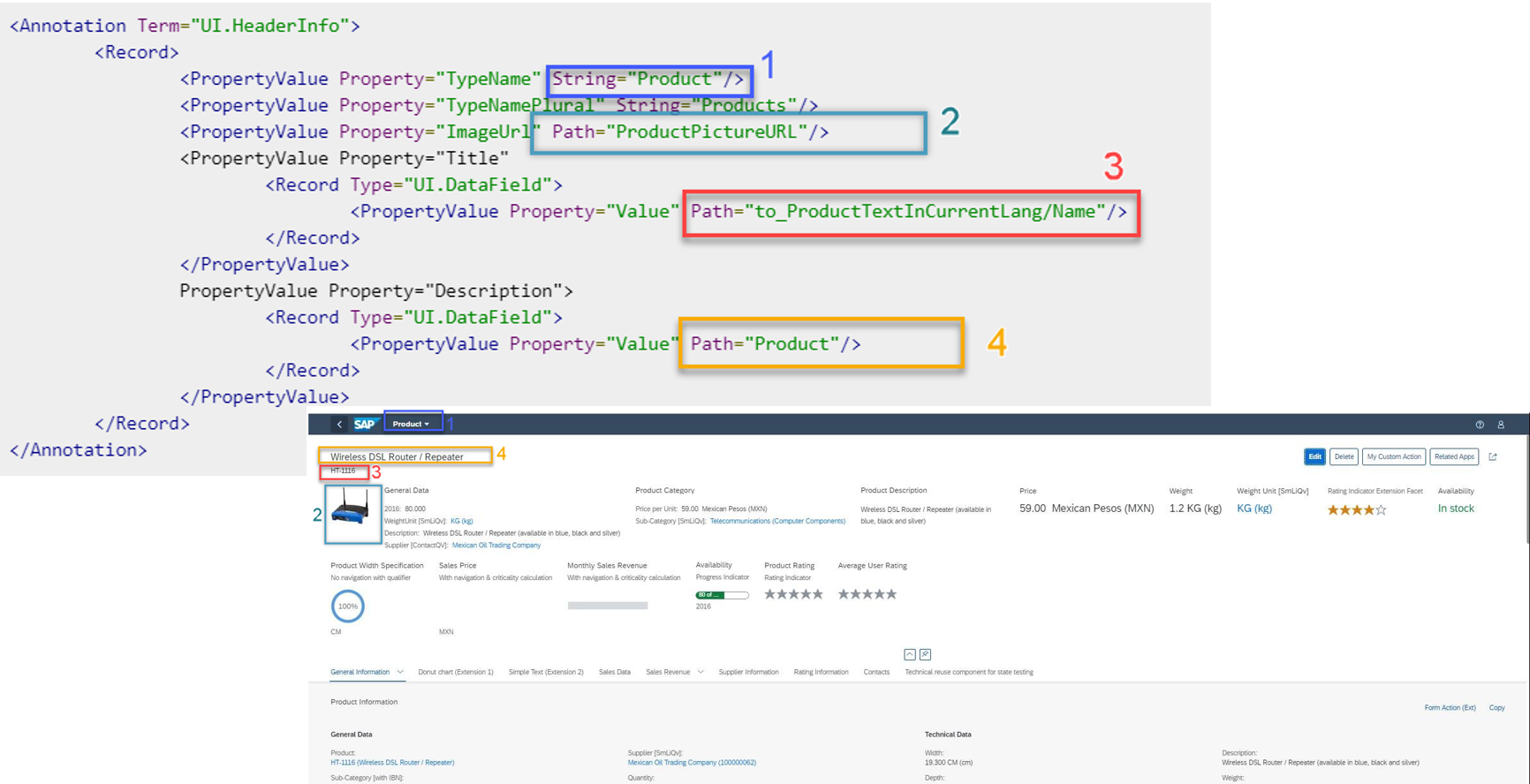
This figure shows how to set up the following basic elements for your object page header in your annotations:
|
Label in Figure |
Element |
|---|---|
| 1 |
Title (Object Type) |
|
2 |
Image of the object instance |
| 3 |
Language-dependent product text in SAP back-end systems |
| 4 |
Product title in SAP back-end systems |
Sample Code
This sample code is a selectable version of the code shown above for setting up the main elements on the object page header.
<Annotation Term="UI.HeaderInfo">
	<Record>
		<PropertyValue Property="TypeName" String="Product"/>
		<PropertyValue Property="TypeNamePlural" String="Products"/>
		<PropertyValue Property="ImageUrl" Path="ProductPictureURL"/>
		<PropertyValue Property="Title"
			<Record Type="UI.DataField">
				<PropertyValue Property="Value" Path="to_ProductTextInCurrentLang/Name"/>
			</Record>
		</PropertyValue>
		PropertyValue Property="Description">
			<Record Type="UI.DataField">
				<PropertyValue Property="Value" Path="Product"/>
			</Record>
		</PropertyValue>
	</Record>
</Annotation>