Step 4: Add a Back Button to Not Found Page
Step 4: Add a Back Button to Not Found Page
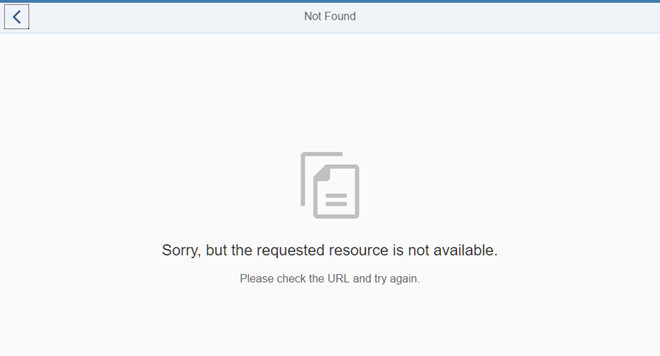
Preview
Coding
You can view and download all files in the Samples in the Demo Kit at Routing and Navigation - Step 4.
webapp/view/NotFound.view.xml
<mvc:View
	controllerName="sap.ui.demo.nav.controller.NotFound"
	xmlns="sap.m"
	xmlns:mvc="sap.ui.core.mvc">
	<MessagePage
		title="{i18n>NotFound}"
		text="{i18n>NotFound.text}"
		description="{i18n>NotFound.description}"
		showNavButton="true"
		navButtonPress="onNavBack"/>
</mvc:View>
In the NotFound view, we set the property
showNavButton of the MessagePage control to
true to automatically display the Back button. We also
add an event handler function onNavBack to the
navButtonPress event of the control. The
onNavBack function will handle the actual back navigation. We
could directly add this function to the view’s controller. However, we are smart
enough to anticipate that we might need the same handler function for different
views. DRY (Don’t Repeat Yourself
) is the right approach for us, so let’s
create a BaseController from which all other controllers will
inherit.
webapp/controller/BaseController.js (New)
sap.ui.define([
	"sap/ui/core/mvc/Controller",
	"sap/ui/core/routing/History",
	"sap/ui/core/UIComponent"
], function(Controller, History, UIComponent) {
	"use strict";

	return Controller.extend("sap.ui.demo.nav.controller.BaseController", {

		getRouter : function () {
			return UIComponent.getRouterFor(this);
		},

		onNavBack: function () {
			var oHistory, sPreviousHash;

			oHistory = History.getInstance();
			sPreviousHash = oHistory.getPreviousHash();

			if (sPreviousHash !== undefined) {
				window.history.go(-1);
			} else {
				this.getRouter().navTo("appHome", {}, true /*no history*/);
			}
		}

	});

});
Create a new BaseController.js file in the
webapp/controller folder. The base controller implements a set
of functions that are reused by its subclasses. The onNavBack
handler is a great example of code that we don’t want to duplicate in our
controllers for each page that has a back navigation.
The function checks if there is a previous hash value in the app history. If so, it redirects to the previous hash via the browser’s native
History API. In case there is no previous hash we simply use the router to navigate to the route appHome
which is our home view.
The third parameter of navTo("appHome", {}, true /*no history*/); has the value true and makes sure that the hash is
replaced. With the line sap.ui.core.UIComponent.getRouterFor(this) you can easily access your component’s router throughout the
app. To make it even more comfortable, we also add a handy shortcut getRouter to the base controller. This function is now
available in each subclass as well. It is also used in the onNavBack handler to get a reference to the router before calling
navTo. We now have to implement the reuse in all other controllers.
In SAPUI5 there are multiple options to reuse code. We recommend to use a base controller
for such helper methods because this allows us to decoratively use the onNavBack handler directly in any XML view without
adding additional code to the controller. Our base controller is an abstract controller that will not be instantiated in any view.
Therefore, the naming convention *.controller.js does not apply, and we can just call the file
BaseController.js. By not using the naming convention *.controller.js we can even prevent any usage in
views.
webapp/controller/NotFound.controller.js
sap.ui.define([
	"sap/ui/demo/nav/controller/BaseController"

], function (BaseController) {
	"use strict";
	return BaseController.extend("sap.ui.demo.nav.controller.NotFound", {
		onInit: function () {
		}
	});
});
In order to reuse the base controller implementation, we have to change the
dependency from sap/ui/core/mvc/Controller to
sap/ui/demo/nav/controller/BaseController and directly extend
the base controller.
At this point you can open index.html#/thisIsInvalid in your browser
and press the Back button to see what happens. You will be redirected to the
app’s home page that is matched by the route appHome as you opened
the Not Found page with an invalid hash. If you change the hash to something
invalid when you are on the home page of the app, you will also go to the Not
Found page but with a history entry. When you press back, you will get to
the home page again, but this time with a native history navigation.
webapp/controller/App.controller.js
sap.ui.define([
	"sap/ui/demo/nav/controller/BaseController"

], function (BaseController) {
	"use strict";
	return BaseController.extend("sap.ui.demo.nav.controller.App", {
		onInit: function () {
		}
	});
});
To be consistent, we will now extend all of our controllers with the base controller. Change the app controller as described above.
webapp/controller/Home.controller.js
sap.ui.define([
	"sap/ui/demo/nav/controller/BaseController"

], function (BaseController) {
	"use strict";
	return BaseController.extend("sap.ui.demo.nav.controller.Home", {
	});
});
The same applies to our home controller, we also extend it with the base controller now.
In this step we have added the Back button. The user can always use the browser’s native Back button as well. Each app can freely configure the behavior of the Back button. However, there is no clean way to apply the same logic for the browser’s Back button in single-page applications. Tweaking the browser history or using other quirks for cancelling backward or forward navigation is not recommended due to the implementation details of the browsers. The browser’s Back button always uses the browser history while the Back button of the app can make use of the browser history or can implement its own navigation logic. Make sure to understand this difference and only control the Back button inside the app.
Conventions
-
Implement a global
onNavBackhandler for back navigation in your app -
Query the history and go to the home page if there is no history available for the current app
Parent topic: Navigation and Routing
Previous: Step 3: Catch Invalid Hashes