Enabling Actions in Object Page Header
Enabling Actions in Object Page Header
Edit and Delete are the generic actions.
All com.sap.vocabularies.UI.v1.DataFieldForAction within the unqualified UI.Identification are
interpreted as actions. The system renders a button within the header displaying the text of the data field label.
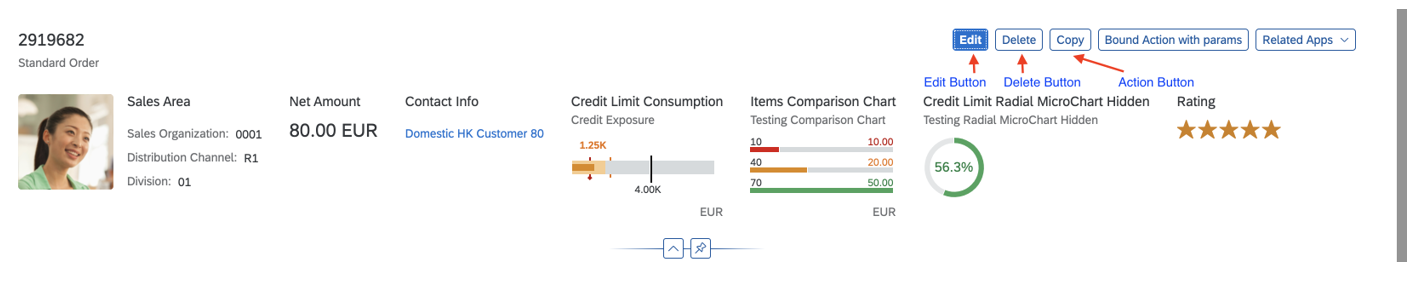
Annotations for the Copy button:
<Annotation Term="UI.Identification">
      <Collection>
            <Record Type="UI.DataFieldForAction">
                  <PropertyValue Property="Label" String="Copy" />
                  <PropertyValue Property="Action"
                        String="STTA_PROD_MAN.STTA_PROD_MAN_Entities/STTA_C_MP_ProductCopy" />
                  <Annotation Term="UI.Importance" EnumMember="UI.ImportanceType/High" />
            </Record>
...
      </Collection>
</Annotation>
In SAP Fiori elements for OData V2, the object page context is always passed when a header action is invoked.
In SAP Fiori elements for OData V4, the object page context is only passed for bound header actions. For the unbound actions, no context is passed.
Edit and Delete Buttons
The Edit and Delete buttons are displayed as shown above, if the following conditions are met:
-
Edit button:
sap:updatableis not set tofalse - Delete button:
sap:deletableis not set tofalse
If you want to specify conditions for deletion or updates (using the
deletable-path or updatable path
annotation), you need to ensure that you have not made the
sap:deletable or sap:updatable setting
in your annotations.
For more information on Delete button, see Enable or
Disable Delete Button (Using deletable-path Annotations)
section in Adding Actions to Tables.
Show or Hide Edit
Button
(Using
updatable-path
Annotation)
You can choose to display or hide the Edit button on the object page based on certain conditions in your back-end system. For example, you may wish to disable editing for a sales order that has already been paid.
Within your annotation, you set the
updatable-path
for
the Edit
button
to point to a particular property of an object (entity) in the back-end system
that is either true or false. If the value of
this property is true, the
Edit
button is displayed; if it is false, it is hidden.
If you want to specify conditions for updatable-path
annotation, you need to ensure that you have not made the
sap:updatable setting in your annotations.
Code Samples
updatable-path
The code sample below shows you how to set up your annotation to display or hide
the Edit button, based on the value of the
Updatable_mc property in the back-end
system.
<Annotations Target="STTA_PROD_MAN.STTA_PROD_MAN_Entities/STTA_C_MP_Product">
    <Annotation Term="Org.OData.Capabilities.V1.UpdateRestrictions">
        <Record>
            <PropertyValue Property="Updatable" Path="Updatable_mc"/>
        </Record>
    </Annotation>
</Annotations>Edit and Delete Buttons
The Edit button allows users to edit the instance of the object page.
The Delete button allows users to delete the instance of the object page.
-
The
updateRestrictions, a new property is completely ignored. Draft applications always have anEditAction. Sample annotation:<Annotation Term="com.sap.vocabularies.Common.v1.DraftRoot"> <Record> <PropertyValue Property="EditAction" String="com.sap.gateway.srvd.sadl_gw_appmusicdr_definition.v0001.EditAction"/> </Record> </Annotation> } } -
The visibility of the Edit button can be controlled by the
updateHiddenannotation underentityTypeannotations (it can be path-based if the apps need to hide the edit button, for example, for only specific instances).<Annotation Term="UI.updateHidden" Bool="true"/>
For more information on visibility of Delete button, see Show or Hide the Delete Button section in Adding Actions to Tables.
Edit Enablement
If the application defines an EditAction, the
UpdateRestrictions are completely ignored. Instead, the
OperationAvailable determines the enablement of the
button.
-
If
OperationAvailable= true (static) OR ifOperationAvailableis not defined, theEditbutton is visible (provided thatupdateHiddendoesn’t evaluate to false) and enabled. -
If
OperationAvailable= false (static), theEditbutton is not visible. -
If
OperationAvailable= <path>, the enablement of theEditbutton depends on whether the path returns true or false. If the path returns null, the button is visible but disabled.
Custom Global Actions
Applications can define their own "global" actions. Those actions defined under
the unqualified UI.Identification, that are not set to
determining=true, are considered as global actions and
rendered beside the standard actions in the header. The object page context is
passed to the action if the action is configured as a bound action or as a
DataFieldForIBN. For an unbound action, no context is
passed. For information about custom annotation actions, refer to Setting the Criticality for Actions and Actions.
The following sample shows examples of global actions:
<Annotation Term="UI.Identification">
    <Collection>
        ...
        <Record Type="UI.DataFieldForAction">
            <PropertyValue Property="Label" String="Break Up" />
            <PropertyValue Property="Action" String="com.sap.gateway.srvd.sadl_gw_appmusicdr_definition.v0001.BREAK_UP" />
        </Record>
        <Record Type="UI.DataFieldForIntentBasedNavigation">
            <PropertyValue Property="Label" String="SampleIBN"/>
            <PropertyValue Property="SemanticObject" String="MySemanticObject"/>
            <PropertyValue Property="Action" String="manage"/>
            <PropertyValue Property="RequiresContext" Bool="false"/> // For header IBN buttons, this should only be false or not specified!
        </Record>
        ...
    </Collection>
</Annotation>
In the sample above, "UI" is used as an alias for
com.sap.vocabularies.UI.v1.
You control the visibility of the custom global actions by using the
UI.Hidden annotation. If static true or path-based evaluate
to true, the action button is hidden.
You control the enablement for the DataFieldForAction buttons
via the OperationAvailable mechanism in the same way as it is
done for the Form actions. The intent-based navigation (IBN)
buttons will always be enabled if the target application is reachable for the
user.
The UI.DataFieldForAction can be bound or unbound actions. For
more information, see Bound and Unbound Actions section in Adding Actions to Tables.