What's New in SAPUI5 1.72
What's New in SAPUI5 1.72
New Features
|
New Theme Available for SAP Fiori 3 User Experience (Experimental) To further support the SAP Fiori
3 user experience, a new theme has been introduced: SAP Quartz Dark (theme ID:
Note
This theme will have the status 'experimental' until testing is complete. |
| Responsive Paddings Enablement We have introduced the
For more information, see Enabling Responsive Paddings According to the Control Width. |
New Controls
The new layout control is a single-level navigation menu that offers access to the entry pages of products. Its items can be configured with an image/icon, title, subtitle, and navigation target. 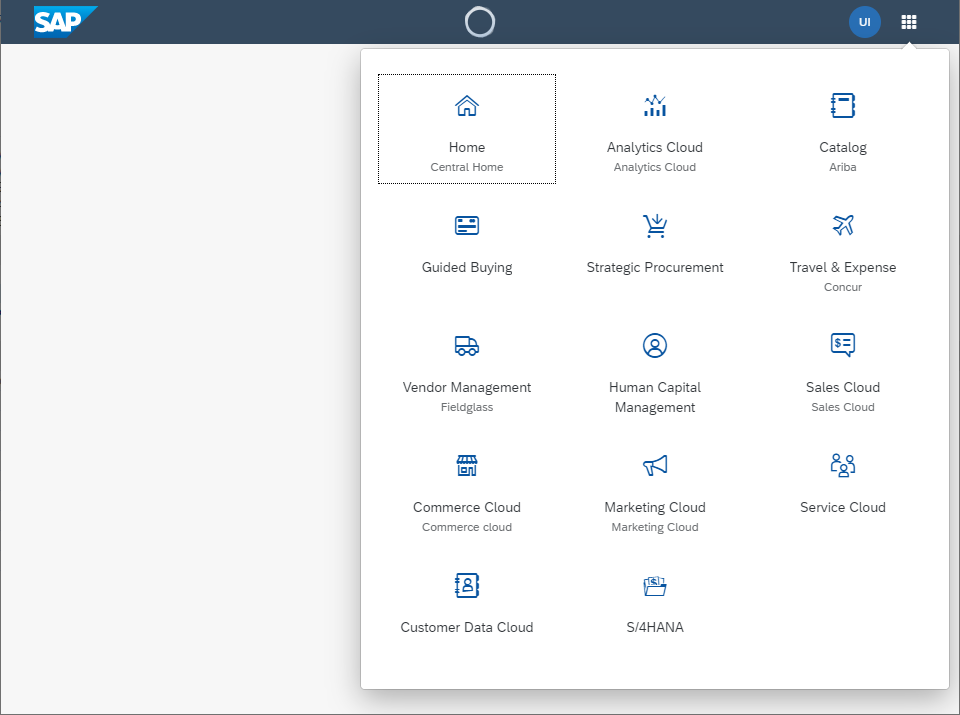 For more information, see the API Reference and the Samples. |
Improved Features
|
Navigation in Nested Components The navigation in nested components has been enhanced with additional information that can now be passed in
optional parameters of the For more information, see |
|
SAPUI5 OData V4 Model The new version of the SAPUI5 OData V4 model introduces the following features:
Restriction
Due to the limited feature scope of this version of the SAPUI5 OData V4 model, check that all required
features are in place before developing freestyle and SAP Fiori elements applications. Double-check the detailed
documentation of the features, as certain parts of a feature may be missing. While we aim to be compatible with
existing controls, some controls might not work due to small incompatibilities compared to
For more information, see OData V4 Model, the API Reference, and the Samples. |
|
Title Alignment Changes for SAP Quartz Themes A new title alignment has been introduced for the SAP Quartz themes. The title of the affected control is aligned to the start position (left or right depending on the text directionality). Affected Controls:
|
Improved Controls
|
We have added more options in the |
|
Some methods in the helper class rely on the internal |
sap.m.ActionSheetWe have extended the |
sap.m.ComboBox, sap.m.MultiComboBox,
sap.m.Input, sap.m.MultiInputWe
have improved the controls to display the text set in the |
|
We have introduced an optional footer with OK and Cancel buttons, to provide an alternative way for users to confirm the date range selection. For more information, see the API Reference. |
|
|
|
The |
|
If applications configure a responsive table that contains only one column in such a way that all columns are moved to the pop-in or hidden on smaller screens, this setting is now ignored to ensure that there is at least one column visible in the tabular layout. For more information, see the API Reference. |
|
The Reset button is now fully available for all the tabs in this control.
For more information, see the API Reference. |
sap.m.WizardWe have added a new |
|
We have introduced new key combinations that you can use for opening the table personalization settings and for opening the Export As dialog for the spreadsheet export. For more information, see the FAQ under Smart Table and the Sample. |
|
For more information, see Card Explorer. |
|
|
|
The new |
|
You can now subscribe to the new |
SAP Fiori Elements
General Features SAP Fiori elements now provides keyboard shortcuts for basic operations. For more information, see Keyboard Shortcuts. List Report and Object Page The object page has the following new features:
Analytical List Page
|
In this section:
Parent topic: Previous Versions
Previous:
Next:
Related information
- What's New in SAPUI5 1.82
- What's New in SAPUI5 1.81
- What's New in SAPUI5 1.80
- What's New in SAPUI5 1.79
- What's New in SAPUI5 1.78
- What's New in SAPUI5 1.77
- What's New in SAPUI5 1.76
- What's New in SAPUI5 1.75
- What's New in SAPUI5 1.74
- What's New in SAPUI5 1.73
- What's New in SAPUI5 1.71
- What's New in SAPUI5 1.70
- What's New in SAPUI5 1.69
- What's New in SAPUI5 1.68
- What's New in SAPUI5 1.67
- What's New in SAPUI5 1.66
- What's New in SAPUI5 1.65
- What's New in SAPUI5 1.64
- What's New in SAPUI5 1.63
- What's New in SAPUI5 1.62
- What's New in SAPUI5 1.61
- What's New in SAPUI5 1.60
- What's New in SAPUI5 1.58
- What's New in SAPUI5 1.56
- What's New in SAPUI5 1.54
- What's New in SAPUI5 1.52
- What's New in SAPUI5 1.50
- What's New in SAPUI5 1.48
- What's New in SAPUI5 1.46
- What's New in SAPUI5 1.44
- What's New in SAPUI5 1.42
- What's New in SAPUI5 1.40
- What's New in SAPUI5 1.38